You’re burning accounts faster than you can create them. Every fresh profile gets flagged in 48 hours, your content never leaves the 200-view purgatory, and the ad account you actually need keeps getting nuked before the first deposit clears. Sound familiar?
This guide walks you through how to farm TikTok accounts from scratch the way working operators do it in 2026 — not theory pulled from a Telegram channel, but the actual sequence that survives TikTok’s current trust scoring. You’ll get the warmup timeline day by day, the behavioral signals the algorithm watches, device and identity hygiene that holds up under review, and the specific mistakes that kill 90% of farms before they earn a cent.
Let’s get into the build.
Key Takeaways
- A solo TikTok farm of 10 accounts costs roughly $400–$700 to set up and $150–$300 per month; a 100-account operation runs $3,500–$8,000 in setup and $1,200–$2,500 monthly.
- Warm-up should run 7 days for Tier-2/Tier-3 GEOs and 10–14 days for Tier-1 (US, UK, CA, AU), with no posting before day 7 and pure FYP consumption on day 1.
- Mobile 4G/5G carrier IPs deliver the highest trust on TikTok in 2026, residential IPs are the budget workhorse, and datacenter ranges are pre-flagged and unusable.
- Bulk $0.10 accounts show 30–60% week-one ban rates plus 20–30% silent shadowbans, pushing effective cost per working account to $1–$3 versus $40–$70 for self-farmed.
- Healthy cohort metrics target above 80% day-1 registration survival, above 70% at day 7, and under 25% ban rate by week 4 — rising bans across fresh batches mean fingerprint or IP inputs are burned.
What TikTok Account Farming Actually Means in 2026
TikTok account farming is the disciplined process of registering, warming up, and configuring accounts so they can carry traffic without tripping moderation. It’s not spam — it’s provisioning. Spam dies in 24 hours; a farmed account survives months and converts.
The gap between a fresh registration and a farmed account lives on TikTok’s internal trust score. A brand-new account sits in newborn shadowban territory by default: limited reach, throttled FYP exposure, aggressive review on the first commercial action. A properly farmed account has watch history, interactions, a consistent device fingerprint, and a clean IP — it walks past those gates.
2026 made this harder. TikTok now reads 50+ device attributes, runs ML behavior models that flag mechanical patterns, and post-divestiture US routing changes broke a lot of old setups overnight. Yes, TikTok’s terms restrict bulk creation — noted, moving on.
Who runs farms in practice: TikTok Shop affiliates stacking creator accounts, CPA buyers diversifying ad accounts and organic seeders, and agencies managing 50–500 client accounts from one operations desk.
The Full Cost Breakdown: What a TikTok Farm Really Costs to Start
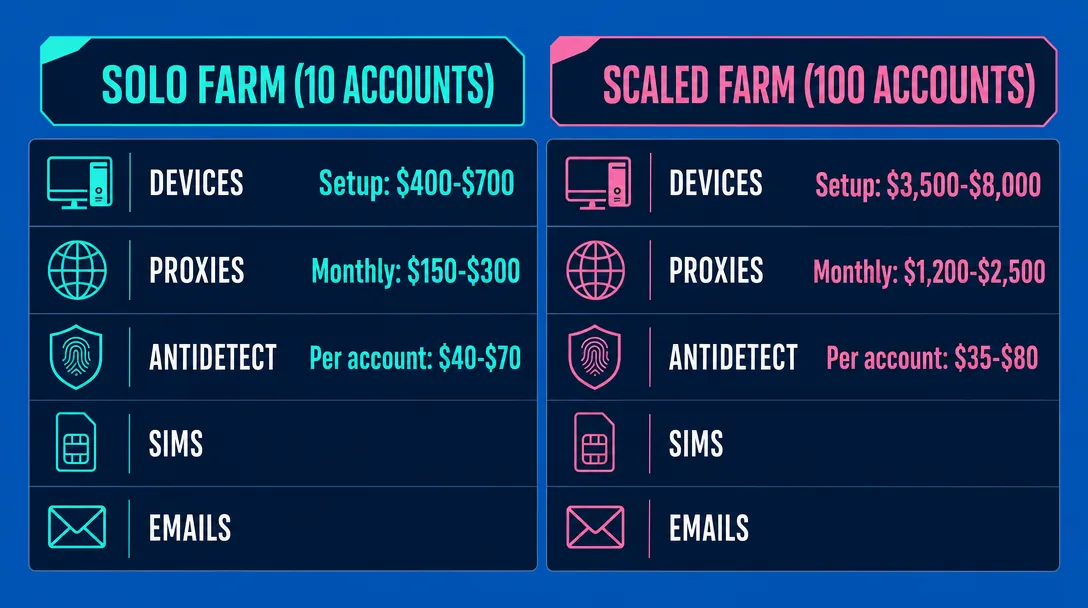
A solo operator running 10 farmed TikTok accounts spends roughly $400–$700 on initial setup and $150–$300 per month to keep them alive. Most guides hand-wave the budget. Here’s the actual math, line by line, so you can size a farm before you spend a dollar.
Per-component cost breakdown
| Component | Solo (10 accounts) | Scaled (100 accounts) |
|---|---|---|
| Devices: real phones ($150–$300) or cloud phones ($7–$15/account/mo) | $300–$600 hardware OR $70–$150/mo | $1,500–$3,000 (mix) + $700–$1,500/mo cloud |
| Mobile (4G/5G, $25–$80/port) or residential routing ($3–$8/GB) | $50–$150/mo | $800–$1,800/mo |
| Antidetect browser ($30–$100/mo per seat) | $30–$100/mo | $150–$400/mo (multi-seat) |
| SIMs / eSIMs / virtual numbers ($2–$15 each) | $20–$150 one-time | $200–$1,500 one-time |
| Email accounts ($0.05–$0.50 each) | $1–$5 | $10–$50 |
Cost per account, blended: roughly $40–$70 to spin up solo, dropping to $35–$80 at 100-account scale where infrastructure seats amortize. Monthly cost per account lands around $15–$25 ongoing.
For a 100-account operation, plan on $3,500–$8,000 in setup and $1,200–$2,500 per month to keep routing, antidetect browser seats, and cloud phones running. At that scale, payment plumbing matters too — virtual cards for media buying teams become the cleanest way to spin up subscriptions for routing providers and cloud phones without burning your personal cards on every renewal.
From experience, when we first considered the unit economy of a farm with 50 accounts, we forgot to include the cost of burning – that is, accounts that will die on registration and in the first week of cooking. Always make a real calculation with an adjustment of at least 25-30% of losses in the first month, otherwise the figure “cost of a live account” in the tablet and in life will differ by one and a half times. This is the most common mistake of newbies who see $40 for an account and think that this is how it will be.
What about $0.10 ready-made accounts?
The math looks unbeatable — buy 1,000 accounts for $100 and skip the farm entirely. Reality is uglier. Bulk accounts from marketplaces typically show 30–60% ban rates inside the first week, another 20–30% sit at 0 views (shadowbanned at registration), and the survivors often share fingerprints flagged across other buyers’ batches. Effective cost per account that actually posts and gets reach climbs to $1–$3, and you inherit whatever the seller did during creation. Farming your own is more expensive upfront but produces accounts you can actually run offers on.
Infrastructure Stack: Routing, Devices, and Antidetect
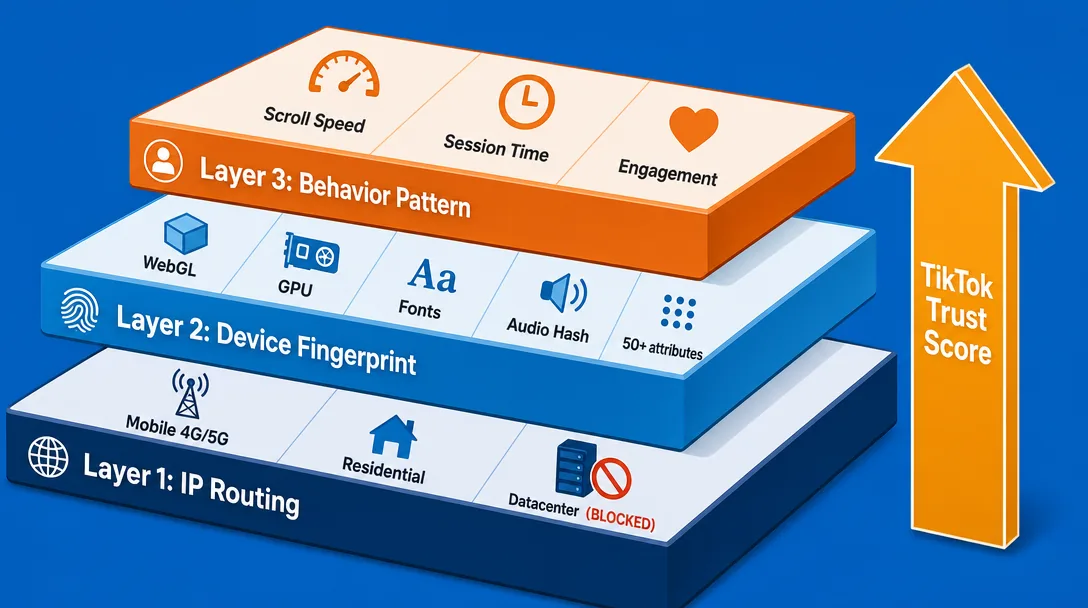
TikTok doesn’t ban accounts — it bans setups. Every action you take is scored against three stacked layers: the IP you connect from, the device fingerprint you present, and the behavior pattern you produce. Break one layer and the other two won’t save you. A clean residential IP on a leaky browser fingerprint dies just as fast as a perfect fingerprint behind a flagged datacenter range.
Routing: datacenter is dead
Datacenter IPs are a non-starter for TikTok in 2026 — the ASN ranges are public and pre-flagged. Your real choice is between residential IPs (real ISP addresses from home networks) and 4G/5G mobile carrier IPs (addresses from NAT pools). Mobile wins on trust because thousands of legit users share each IP, but it’s pricier and slower. Residential is the workhorse for scale. Rule one: one IP per account, sticky session, no sharing. Rule two: no aggressive rotation mid-session — TikTok reads a mid-scroll IP swap as a hijack signal.
Device options compared
| Setup | Cost per account | Scale ceiling | Realism | Learning curve |
|---|---|---|---|---|
| Physical phone farm | $80–$150 | ~50 devices | Highest | Medium |
| Cloud phones (e.g., GeeLark at $0.007/min with a $1.20/day cap, or $29.90/month per device rental) | $5–$30/mo | 500+ | High | Low |
| Antidetect browser | $1–$3/mo | 1,000+ | Lowest (web-only) | Medium |
Phone farms are king for TikTok Shop sellers running 20–40 accounts where account value justifies hardware. Cloud phones hit the sweet spot for mid-scale operators — automation suites like TikMatrix price tiers from $29/month (Starter, 5 concurrent phones) up to $149/month (Business, 100 concurrent phones) sit on top of either real or cloud devices. Antidetect browsers work for web-based actions (uploads, comments) but can’t replicate the mobile app signals TikTok prefers.
Fingerprint hygiene
TikTok reads 50+ device attributes: WebGL renderer, GPU model, installed fonts, battery curve, accelerometer noise, push token, screen DPI, audio context hash, and more. Each account needs a unique, internally consistent fingerprint — and that fingerprint must stay stable across sessions. Randomizing on every login is the fastest way to get flagged.
GEO consistency
Device language, system timezone, SIM country code, and IP geolocation all have to agree. A US English device on a Brazilian IP with a UK SIM is an instant trust-score hit.
Account Registration: SIMs, Emails, and Avoiding Errors
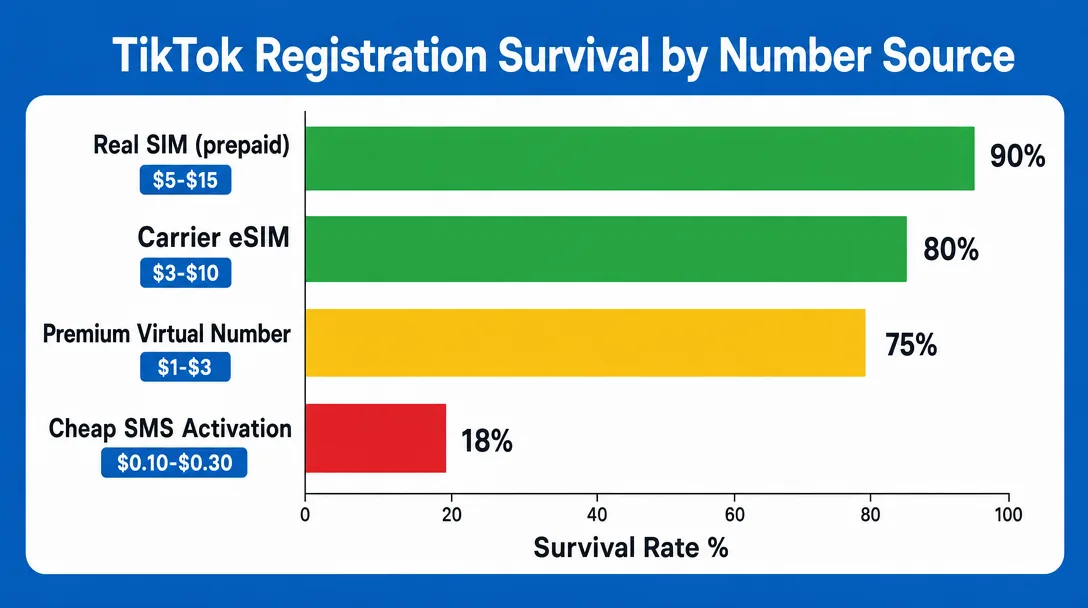
Registration kills roughly 60% of TikTok farms before warm-up even begins. The phone number you use, the email you pair it with, and the IP behind the request all leave fingerprints — and TikTok reads them at signup, not later.
Number sources, ranked by survival
- Real SIMs (~$5–$15 each, prepaid): highest trust. TikTok treats them like normal users.
- eSIMs from carriers ($3–$10): solid second choice, especially for US/UK GEOs. Watch for carrier reuse — pools get flagged.
- Premium virtual numbers ($1–$3): services with non-VoIP US/EU numbers work, but expect 70–80% survival.
- Cheap SMS-activation services ($0.10–$0.30): numbers are recycled across thousands of registrations. Survival under 20%.
Email strategy
Sign in with Apple gives the best survival rate — TikTok trusts the Apple relay and skips deeper email checks. Pair it with a fresh iCloud on a real or cloud iPhone. Fresh Gmail with phone confirmation (aged 7+ days) is the realistic backup. Bulk-purchased emails from marketplaces are the fastest way to a bot flag at first login.
Common errors decoded
- “Too many attempts. Try again later.” — Your IP or device fingerprint already touched too many signups. Cool down or rotate both.
- “Slow down, you’re trying too often.” — Rate limit on the IP. Usually clears in 30–60 minutes.
- Endless captcha loop (slide puzzle keeps reappearing) — TikTok flagged the session as automated. Kill it, change fingerprint, restart.
- “This phone number is already in use” — Recycled SIM. Burn it.
Fix list
Rotate IP every 2–3 registration attempts, even on a clean residential connection. After any hard error, cool the IP for 24 hours before retrying. Never reuse a burned device fingerprint — even one bounced signup poisons it for the next account.
The 7–14 Day Warm-Up Schedule (Day by Day)
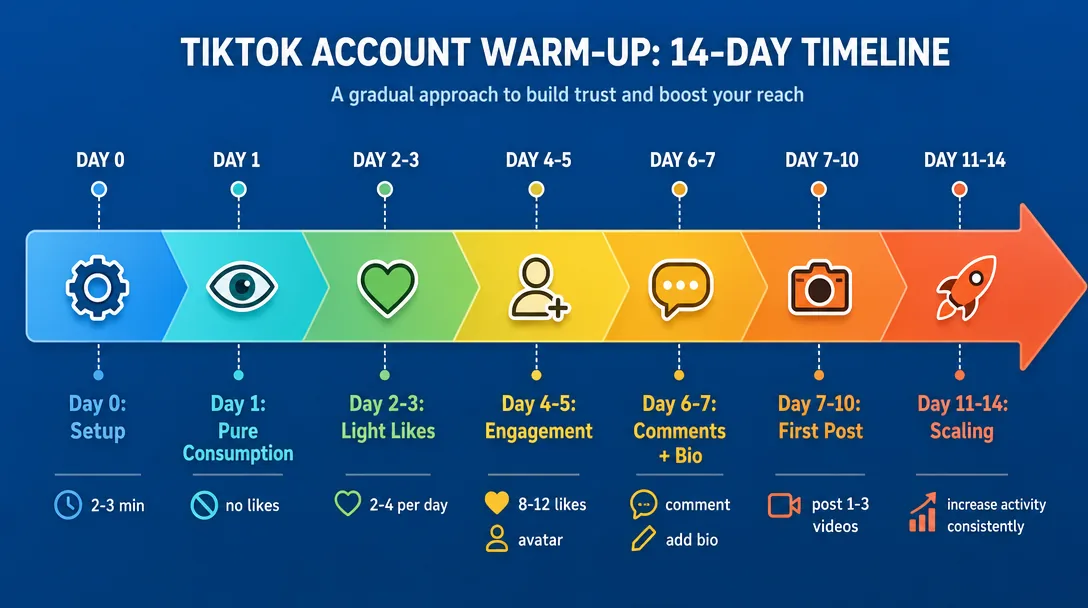
Account warm-up is the difference between an account that hits 10K views on its first post and one that pulls 23 views forever. TikTok scores every new account on a hidden trust metric — engagement patterns, session quality, device consistency, IP reputation. Skip the warm-up and you trigger newborn shadowban: the account technically exists, posts publish, but the FYP algorithm refuses to distribute. No appeals process fixes it. You burn the account and start over.
Two tracks below. The 5–7 day warm-up works for Tier-2/Tier-3 GEOs and lower-stakes funnels. The 14-day plan is the safe track for Tier-1 (US, UK, CA, AU) and TikTok Shop affiliate accounts where one ban kills weeks of work.
| Day | Phase | Actions | Session length |
|---|---|---|---|
| 0 | Setup | Register, open app, close. No avatar, no bio, no link. | 2–3 min |
| 1 | Consumption | FYP browsing only. Watch full videos in niche. Zero likes. | 20–25 min |
| 2–3 | Consumption | FYP scrolling, 2–4 light likes/day on niche content | 25–30 min |
| 4–5 | Engagement | 8–12 likes, 3–5 follows, add avatar (no bio link yet) | 20–30 min, 2 sessions |
| 6–7 | Engagement | 10–15 likes, 5–8 follows, 3–5 real comments, add bio text | 30 min |
| 7–10 | First post | Original or heavily edited video, one per day max | + 20 min scroll |
| 11–14 | Scaling | 1 post/day, normal engagement, test link in bio around day 12 | 30–40 min |
First post timing matters more than people think. On the 7-day track, drop it on day 7 evening local time to your target GEO. On the 14-day track, day 8–10. Never post on day 0–5 — that pattern screams bot.
Behavior rules apply across both tracks. Scroll speed should look human: 8–15 seconds per video on average, occasional rewatches, sometimes a fast swipe. Vary session times — don’t open the app at 9:00 PM every single day. Never log in twice within 10 minutes; the second session gets flagged as session hijack. Randomize posting hour by ±2 hours around your chosen slot. One account = one schedule = one personality.
In practice, we ran A/B on two cohorts of 20 accounts under the US Shop affiliate: the first went on a 7-day schedule, the second on a 14-day schedule. By day 30, the short branch had 11 out of 20 zero views, the long one had 4. It’s simply unprofitable to be greedy with cooking on Tier—1, an extra week saves you a couple hundred bucks on burning. And separately: do not like anything at all on the first or second day, pure consumption gives a noticeably better rate at the start.
Shadowbans: Causes, Diagnosis, and Recovery
A TikTok shadowban isn’t a single problem — it’s three different failure modes, and the fix depends on which one hit you. Newborn shadowban kills trust on fresh accounts that skipped or rushed warm-up. Content shadowban punishes specific posts: banned hashtags, aggressive CTAs, copy-paste captions. Network shadowban flags the IP or device cohort — usually because you burned an address across too many accounts.
Diagnosis: three quick tests
Run the 0-view problem check first: post a normal video, wait 60 minutes. If views stay at 0 or single digits while old posts still get traffic, something’s wrong. Next, hashtag search test — search a niche hashtag from a logged-out second device. Can you find your video? If no, it’s deindexed. Third, search your username from a fresh device. Account invisible? That’s a network or newborn issue, not content.
Common triggers
Dirty IP recycled from a public pool. CTA stuffing in bio (“link in bio, DM me, click now”). Banned or shadow-listed hashtags — TikTok rotates this list weekly. Identical captions across multiple accounts in your farm. Logging in from a new fingerprint without re-warming session cookies. Any one of these can trigger stop signals from the algorithm within 24 hours.
Recovery playbook
For newborn: extend warm-up another 7 days, delete the suspect post, switch posting GEO inside your antidetect profile, and post only consumption-mimicking activity for 48 hours before retrying content. For content bans: purge the last 3–5 posts, change your niche signal (different hashtags, different audio pool), wait 72 hours. For network: migrate the account to a clean mobile carrier IP and rebuild the fingerprint from scratch — the same device ID will keep dragging the flag.
When to cut losses
If 5+ posts get 0 views after a full ban recovery cycle, retire the account. Sunk-cost farming is how operators waste weeks. Pull the affiliate link, archive the handle, move on.
Scaling, Monetization, and Health Metrics
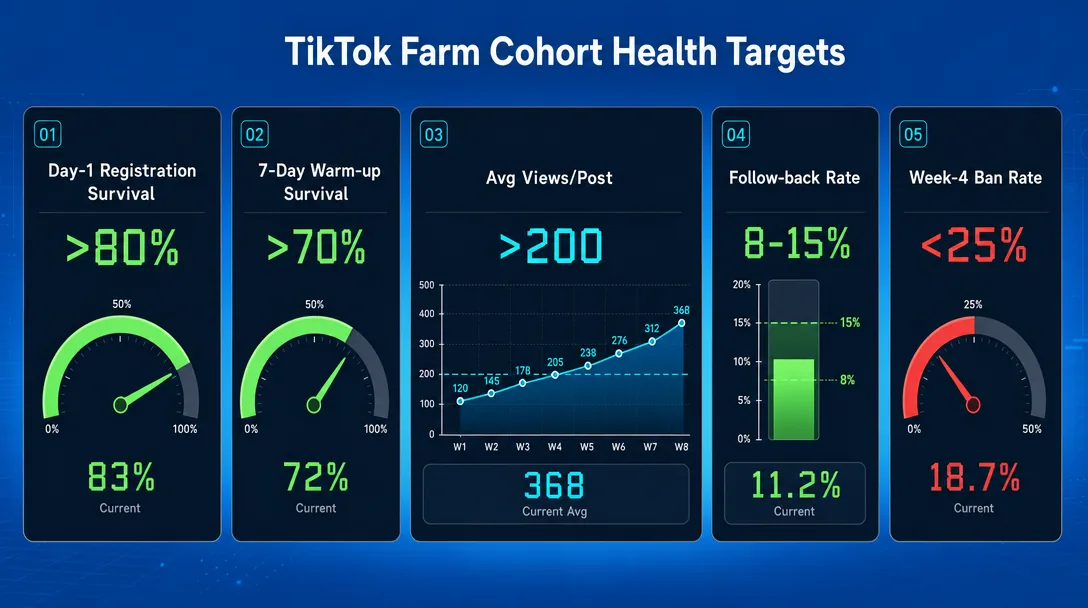
Ten accounts you can babysit on a laptop with sticky notes. Fifty needs spreadsheets and a schedule. Two hundred needs a team, cloud phones, and written SOPs — or your ban rate will eat the margin before you notice.
Scaling math
A solo operator caps out around 20–30 active accounts before warm-up windows start colliding. Add one VA running daily actions on your stack, and you push to 80–100. Agency tier — 300+ accounts — only works with cloud phones, multi-account management dashboards, role separation (farmer, content op, monetizer), and SOPs tight enough that a new hire is productive in week one.
Monetization paths, ranked for 2026
- TikTok Shop affiliate. Highest ceiling, lowest ToS friction. Aged warmed accounts in US/UK GEO with 1k+ followers move volume.
- CPA offers via bio link. Solid revenue, medium risk. Direct affiliate links get flagged fast — route through a landing page.
- Creator rewards / creator fund. Requires verified US identity and 10k followers. Slow but stable for accounts that survive 90 days.
- Account resale. $5–$50 per aged account depending on followers, GEO, and email access. Cash flow play, not a growth play.
KPI metrics by cohort
Track each weekly batch as its own cohort:
| Metric | Healthy target |
|---|---|
| Registration survival (day 1) | >80% |
| 7-day warm-up survival | >70% |
| 30-day view rate (avg views/post) | >200 |
| Follow-back rate on warm-up | 8–15% |
| Cohort ban rate by week 4 | <25% |
Red flags in your data
When cohort ban rate climbs week-over-week across fresh batches, the problem isn’t the accounts — it’s upstream. Your fingerprint profile leaked, your IP pool got burned, or your registration SMS source is flagged. Stop scaling, rotate inputs, run a 10-account test batch before resuming production.
Wrapping Up
Account farming on TikTok rewards patience over speed. The operators who survive past month three are the ones who treat warm-up as a discipline, log every shadowban signal, and refuse to scale before their health metrics prove the cohort is clean. Cheap shortcuts on registration or device fingerprints almost always surface two weeks later as silent reach drops.
Pick five throwaway accounts this week and run them through a strict 10-day warm-up — scroll, like, follow, comment on a fixed schedule, then check reach on day 11. That single test will tell you more about your setup than any guide, and it costs you under $50 to learn whether your stack is ready for real volume.
Frequently Asked Questions
What does it mean to farm TikTok accounts?
How long does it take to warm up a TikTok account?
Is it better to buy TikTok accounts or create them from scratch?
What network setup works best for TikTok in 2026?
Why do new TikTok accounts get 0 views?
How much does it cost to set up a TikTok farm?
Do I need an antidetect browser for TikTok farming?
What are “Too many attempts” and “Slow down” errors?
Can a shadowbanned TikTok account be recovered?
How many TikTok accounts can one person realistically manage?

Content verified by expert
On December 31, 2024, Dmitrii left his position as Head of Media Projects at ADSBASE Group. He currently leads CPA.LIVE and the ADDSET forum.
Holding numerous certificates, Dmitrii confirms his authority in digital marketing.
Dmitrii Medvedko Author
An expert deeply immersed in the affiliate industry. She has managed media projects such as CPA Mafia, CyberAff, ProTraffic, AffTimes, CPA Monstro, and Affiliate Valley, and gained hands-on experience in the nutra segment through the WebVork affiliate network.